How it works

A diary that keeps count, and knows its limits.

Everything Digestly does rests on one idea: write down what happened, when, and to whom — then let arithmetic, not guesswork, say what tends to come before what. This page is the long version.

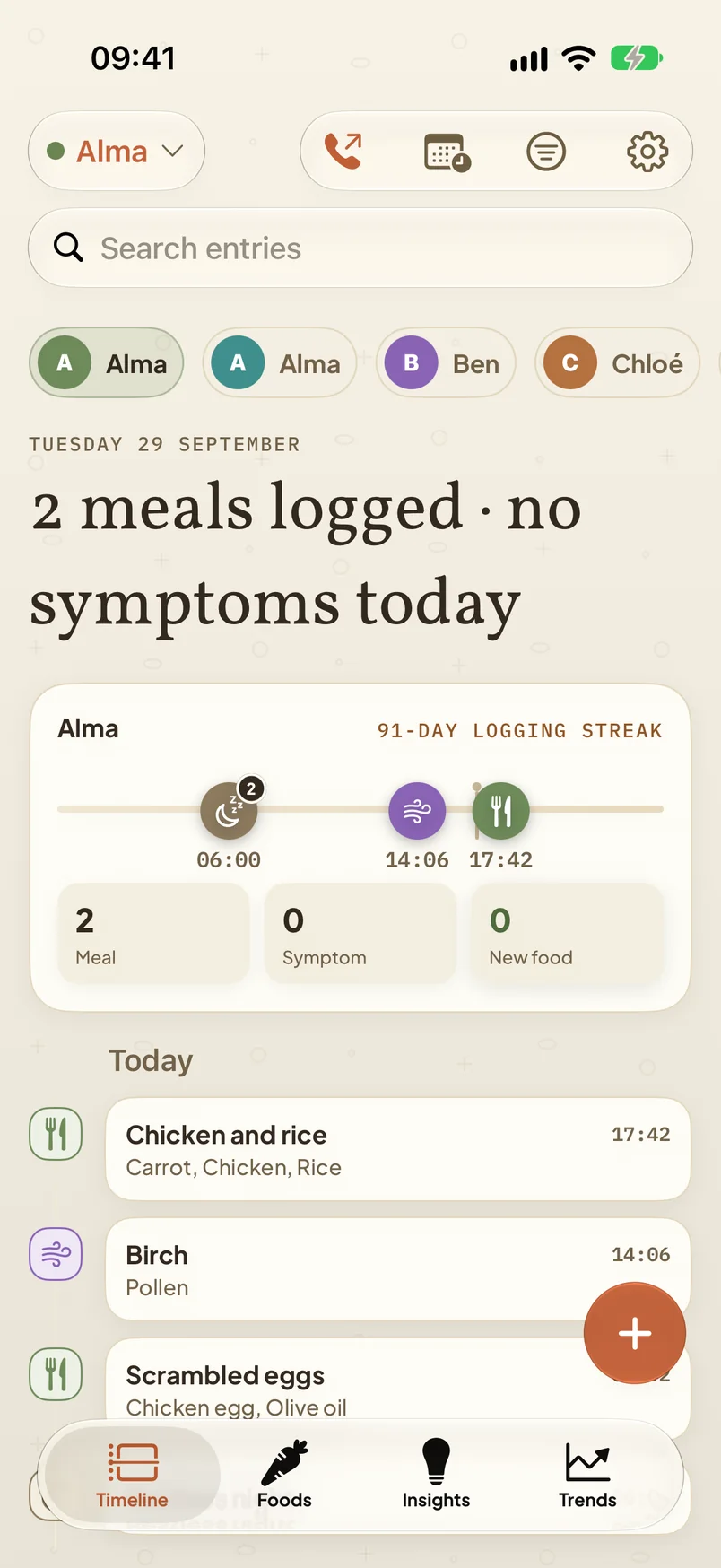
Digestly's Timeline tab: profile chips for four family members, a 91-day logging streak, the day's ribbon of entries, and the Log button.
Timeline — a day in the demo household
1 · Logging

Six kinds of entry, all under fifteen seconds.

A diary only works if it is kept, so the first job is to make an entry cheaper than the thought of skipping it.

Meals

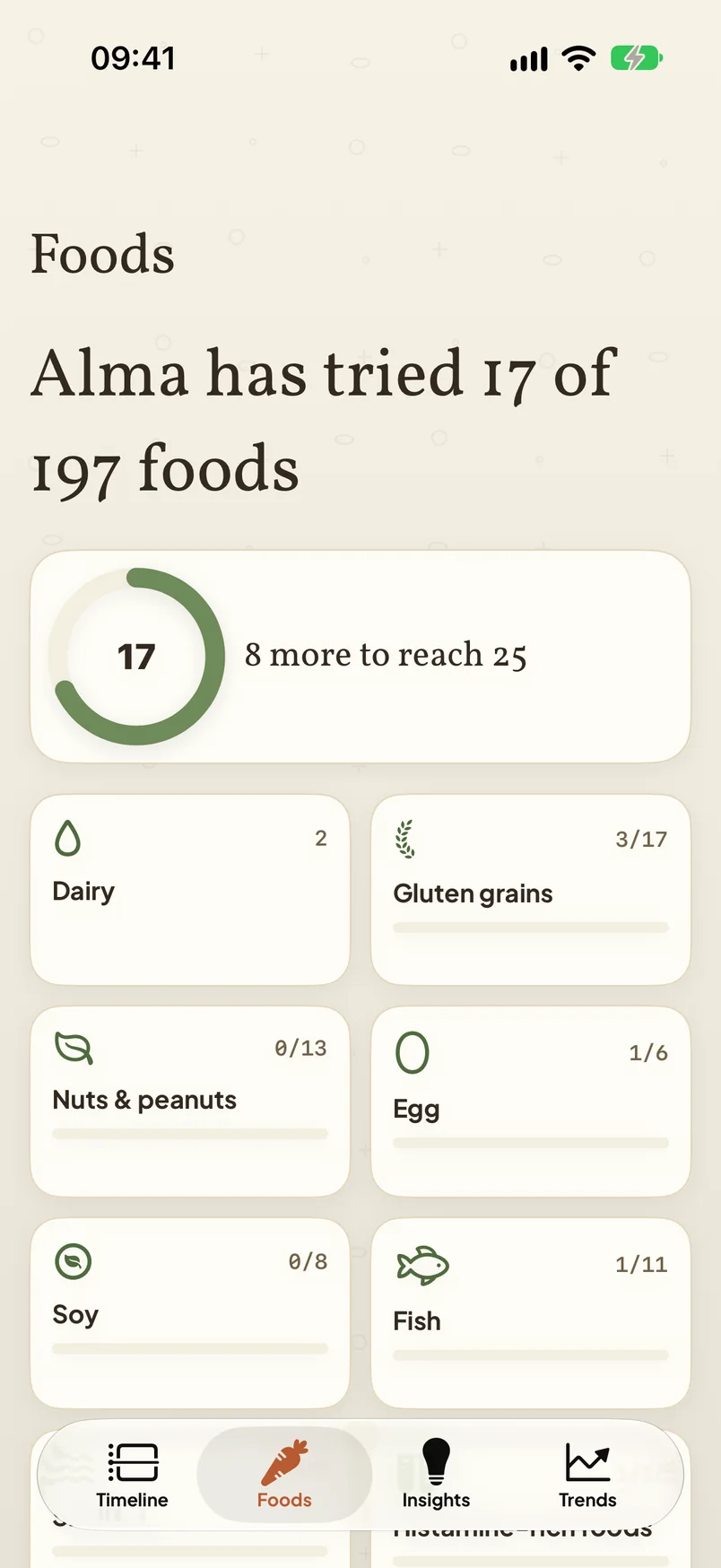
A meal is its ingredients, because patterns are found at the ingredient level — “milk”, not “porridge”. Favourites and recents put the usual breakfast one tap away; “same as yesterday” repeats it; a saved meal remembers its ingredients. A catalogue of nearly two hundred foods with their groups — dairy, gluten grains, nuts, egg, soy, fish, shellfish and more — is built in, and anything missing can be added.

Scan a packet’s barcode and the ingredient list is offered to you. On an iPhone with Apple Intelligence, a photo of the plate can be read on the device and its foods suggested, unticked.

Symptoms

Pick from a catalogue — eczema flare-up, hives, wheezing, reflux, bloating, headache and dozens more — or add your own. Rate it one to five, note the part of the body, attach a photo if it helps. Severity five, or anything involving breathing, shows the emergency-care notice immediately.

On an Apple Watch: the symptom, its severity and the person, in one tap from the wrist.

Exposures

Pollen, animals, skin products, detergents, dust, smoke, a swimming pool. Exposures are compared with symptoms exactly as foods are, because the thing that keeps appearing before a flare-up is not always something that was eaten.

Medication

An antihistamine, an inhaler, a course of antibiotics. Logged so that a pattern which overlaps a medicine can say so on its card — that overlap may be the better explanation, and the app would rather point it out than let a number stand alone.

Sleep

A short night, logged by hand or read from Apple Health if you allow it. Sleep shows alongside symptoms on the Trends tab and annotates patterns in the same way medication does.

Illness

A cold, a stomach bug, a fever. Marked with a start and an end so the days inside it are treated with the suspicion they deserve when patterns are worked out.

2 · Patterns

What tends to come before what — and how sure the app is.

For every food and exposure, and every symptom, Digestly asks: in the hours before this symptom, how often was that item logged, compared with the times it was logged and nothing followed?

It asks that question across several windows — two, six, twenty-four, forty-eight and seventy-two hours — because reactions are not always immediate, and a diary that only looks at the last meal misses the delayed ones entirely. Each answer is put through an exact statistical test, then corrected for the number of pairings tried, so that testing hundreds of combinations does not manufacture a result by chance. Finally the same diary is re-run with its days rotated, and anything that survives that shuffle is thrown out as a coincidence of routine.

What remains is labelled Recurring or Possible, with its counts, the window that matched, and a note of any medicine, illness or poor sleep that overlapped. On generated diaries with no real relationship at all, 3% produce any pattern and 1% produce one at the stronger label. Those figures are part of the app’s own test suite, and the engine cannot change without re-earning them.

Every card opens into its evidence — each entry that counted and each that did not — and a “why am I seeing this?” sheet explains what was compared, in plain language, including what the pattern does not mean.
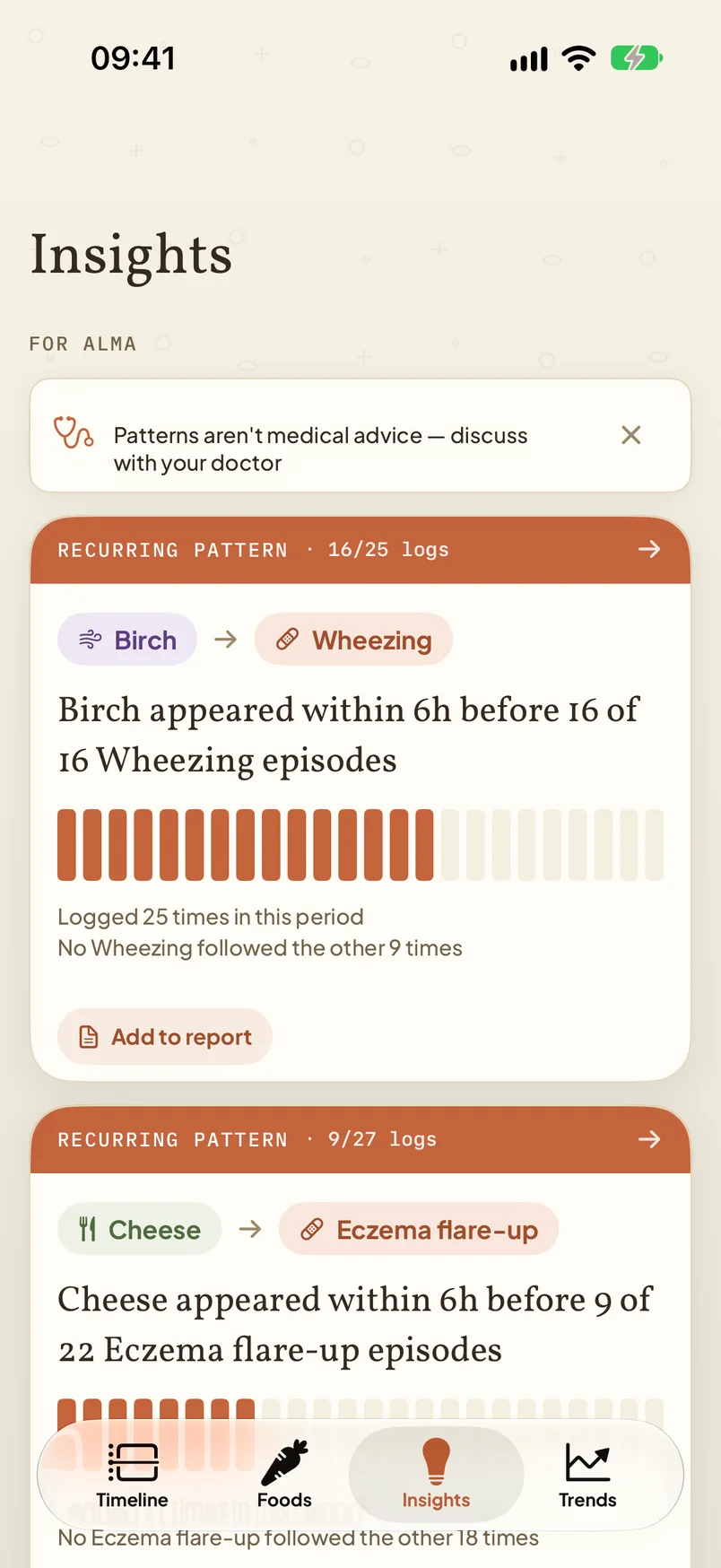
The Insights tab with two recurring pattern cards, each stating the item, the window, the counts, and a note on what the pattern does not mean.
Insights — patterns, counts and caveats
3 · The family

One diary for the household.

Digestly was designed first for parents of babies and children with suspected allergies or intolerances — the people who log the most, on someone else’s behalf, and who most need something to show a clinician.

  • A profile per person

    Children and adults, each with their own log, their own patterns and their own known sensitivities. A switcher sits at the top of every screen.

  • Breastfed babies and the parent who feeds them

    Link the two and the parent’s meals appear alongside the baby’s symptoms, with a second set of windows sized for what reaches a feed. Logging a feed lists what the parent ate in the six hours before. The app says what was logged and when; it does not claim to know what reached the baby.

  • Feeding stages

    Breastmilk, formula, first solids, the family menu. A baby’s stage sets the defaults on the meal picker and never removes an option — an unloggable feed would be a hole in a medical record.

  • Sharing with a co-parent

    A profile can be shared to another phone as a file that is encrypted before it leaves and opened only with a code you pass on yourself. The file leaves through AirDrop or whatever you choose; no server is involved.

The Foods tab: a progress ring showing 17 of 197 foods tried, and tiles per food group showing how many in each have been tried.
Foods — a child’s food journey
4 · For the appointment

What you walk in with.

The doctor report

Choose a person and a date range; get a PDF. A symptom timeline, the foods and exposures that appeared before symptoms with their counts and windows, the exposure and medication log, known sensitivities, and any trial in progress. A CSV export carries the raw diary for anyone who wants to look further.

The disclaimer is printed on every page. A clinician who never saw the app’s settings still sees it.

The emergency card

The allergy action plan your doctor gave you, as a PDF or a photo of the form, stored exactly as you gave it — never read or summarised. The numbers to call. Your clinician’s details. Each adrenaline auto-injector’s expiry, with a reminder before it lapses. Reachable in one tap from the timeline, and as a home-screen widget.

Digestly adds no medical instructions of its own to the card. What is on it came from your doctor.

Elimination and reintroduction trials

If a clinician suggests removing something for a fortnight, record it as a trial. Digestly compares the symptom rate during the trial with the weeks around it and shows both figures side by side, so the follow-up conversation starts from what was observed rather than what was felt.

The app never proposes a trial. It records the one you were advised to run.

5 · Every day

Trends, the wrist, and the home screen.

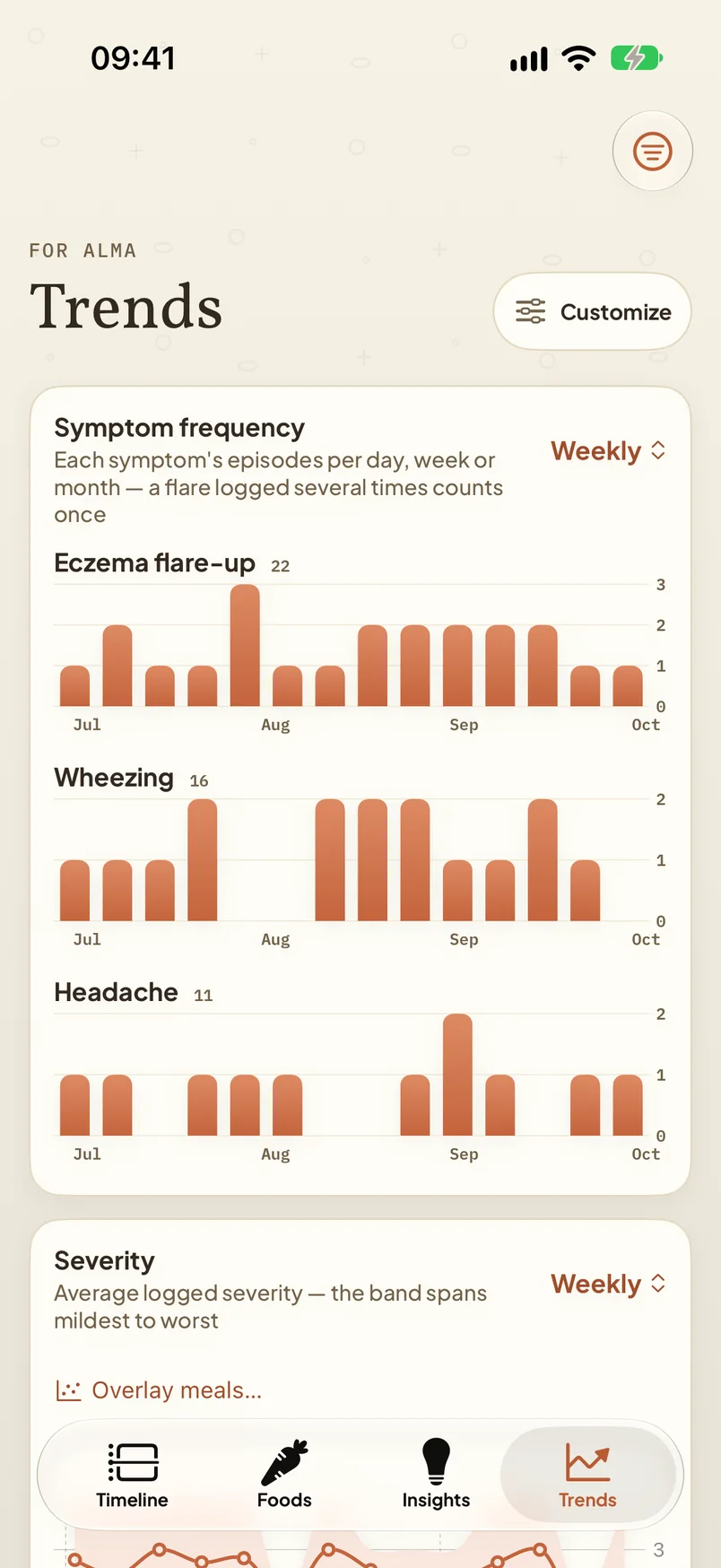
Trends charts each symptom’s frequency and severity by week or month, with sleep and activity from Apple Health overlaid if you have connected it. Foods tracks a child’s journey through first foods, group by group, and shows how each one went.

The Apple Watch app logs a symptom in one tap and shows the emergency-care notice on the wrist when it applies. What travels between watch and phone goes directly between your own two devices, never through a server, and works whether or not iCloud sync is on. A watch-face complication shows today’s counts.

Widgets show today’s meals and symptoms and the logging streak; the emergency widget puts the card one tap away. A Control Center control opens the log directly. Reminders to log are local notifications from your own phone, with a discreet mode that leaves names off the lock screen.

The Trends tab: weekly bar charts of symptom frequency for eczema flare-ups, wheezing and headaches, and a severity band.
Trends — frequency and severity by week

Apple Health, optionally

Off by default. Turn it on and Digestly reads sleep, steps, active energy and exercise minutes — read-only, never written — to show alongside the symptom log. That data stays on the device, is excluded from iCloud sync and from every export, and is deleted the moment you turn the switch off.

Five languages

English, German, Spanish, French and Russian, including the food and symptom catalogues, and a language picker on the very first screen. Some of the translated interface has not yet been read by a native speaker; corrections are welcome and are applied.

Requirements

iPhone with iOS 18 or later. Apple Watch with watchOS 11 or later, optional. Reading a meal from a photo needs an iPhone that supports Apple Intelligence and iOS 27; on other phones the button is simply absent. iCloud sync is optional. There is nothing to sign up for and nothing to pay.

What it will never say

Digestly never states what caused a symptom, never says a person is allergic or intolerant to anything, and never advises changing a diet, stopping a medicine or skipping an appointment. If you ever see wording in the app that reads as a medical judgement — in any of its five languages — please tell us; that is the one class of bug we treat as urgent.

Digestly is a journal, not a medical device. It does not diagnose or treat any condition. Always consult a qualified clinician about allergies — especially for children, and urgently for any severe reaction. Call emergency services for signs of anaphylaxis.

Get Digestly

Free on the App Store. All of it.

Digestly 1.0 is on the App Store, free, with every feature. Download it, and say hello if anything is unclear.

iPhone with iOS 18 or later. Apple Watch optional.